# 生成微调数据
# 准备工作
DISC-LawLLM 主要基于 DISC-Law-SFT-Pair 和 DISC-Law-SFT-Triplet 数据集进行训练,这两个数据集对应了法律专业人员助手、法律咨询服务、法律考试助手、法律专业人员助手和法律咨询服务的情景。
这次实践,使用 Self-Instruct 方法,利用 DISC-Law-SFT-Pair 和 DISC-Law-SFT-Triplet 数据集生成微调数据,以此微调 DISC-LawLLM。Self-Instruct 方法是怎么工作的?如下图:
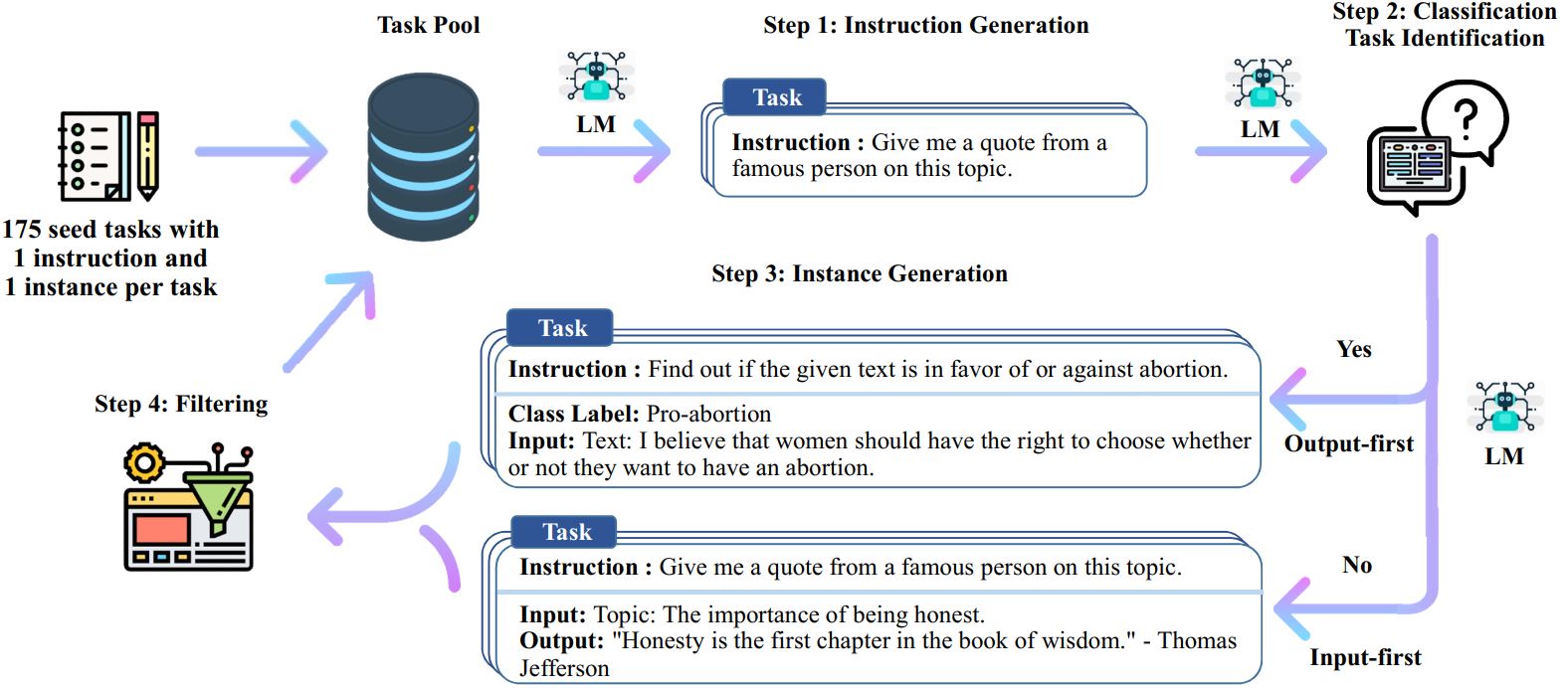
seed tasks 是源数据,Self-Instruct 根据这些源数据生成微调数据。总共有四步:根据 seed tasks 生成指令,判断是否为分类问题,生成实例,微调准备工作。对应四个 bash 文件:
# 1. Generate instructions from the seed tasks | |
./scripts/generate_instructions.sh | |
# 2. Identify whether the instruction represents a classification task or not | |
./scripts/is_clf_or_not.sh | |
# 3. Generate instances for each instruction | |
./scripts/generate_instances.sh | |
# 4. Filtering, processing, and reformatting | |
./scripts/prepare_for_finetuning.sh |
阅读 generate_instructions.sh 以及相关的代码,发现 Self-Instruct 生成数据的逻辑是借助大模型自身去生成数据。那么对于 DISC-Law-SFT-Pair 和 DISC-Law-SFT-Triplet 两个数据集,就是利用法律大模型 DISC-LawLLM 去生成新的法律数据。
观察 self-instruct 项目自带的 seed tasks 示例数据,以及 DISC-Law-SFT-Pair 和 DISC-Law-SFT-Triplet 两个数据集。数据集均是 jsonl 格式,seed tasks 示例数据的每一行都是类似如下的格式:
{ | |
"id": "seed_task_0", | |
"name": "breakfast_suggestion", | |
"instruction": "Is there anything I can eat for a breakfast that doesn't include eggs, yet includes protein, and has roughly 700-1000 calories?", | |
"instances": [ | |
{ | |
"input": "", | |
"output": "Yes, you can have 1 oatmeal banana protein shake and 4 strips of bacon. The oatmeal banana protein shake may contain 1/2 cup oatmeal, 60 grams whey protein powder, 1/2 medium banana, 1tbsp flaxseed oil and 1/2 cup watter, totalling about 550 calories. The 4 strips of bacon contains about 200 calories." | |
} | |
], | |
"is_classification": false | |
} |
DISC-Law-SFT-Pair 的数据每一行则是类似如下格式:
{ | |
"id": "jud_doc_sum-1", | |
"input": "请大致描述这篇文书的内容。\n\n唐鲜明与何伟华、深圳市华名威电汽车服务有限公司侵权责任纠纷一审民事判决书\n......\n没有证据或者证据不足以证明当事人的事实主张的,由负有举证责任的当事人承担不利后果。", | |
"output": "总结:原告与被告侵权责任纠纷一案。原告提出诉求:判决被告赔偿原告医疗费、住院伙食补助费、营养费、护理费、误工费、残疾赔偿金、精神损害抚慰金、后续治疗费、......根据《中华人民共和国民事诉讼法》第六十四条第一款、《最高人民法院关于民事诉讼证据的若干规定》第二条的规定,判决:驳回原告全部诉讼请求。" | |
} |
DISC-Law-SFT-Triplet 的数据每一行则是类似如下格式:
{ | |
"id": "judgement_predit-1", | |
"reference": | |
[ | |
"《刑法》第一百一十四条:【放火罪】【决水罪】【爆炸罪】【投放危险物质罪】......尚未造成严重后果的,处三年以上十年以下有期徒刑。" | |
], | |
"input": "基于下列案件,推测可能的判决结果。\n经审理查明,2015年6月21日15时许,被告人白某某在大东区小河沿公交车站乘坐被害人张某某驾驶的133路公交车,......鉴定结论书,被告人白某某的供述与辩解等证据证实,足以认定。", | |
"output": "根据《刑法》第一百一十四条的规定,被告人白某某以危险方法危害公共安全,尚未造成严重后果。......\n需要注意的是,以上仅为根据提供的案件事实和相关法律条文进行的推理,最终的判决结果还需根据法庭审理的具体情况和法官的判断做出。" | |
} |
因此,需要将法律数据整理成 seed tasks 的格式。观察数据,很明显,无论是 DISC-Law-SFT-Pair 还是 DISC-Law-SFT-Triplet,input 里都包含指令,也就是 seed tasks 里的 instruction,所以需要对 input 进行数据提取。
当数据量相当大的时候,毫无疑问不能人工处理,我们需要用一个部署好的中文大模型进行数据提取,并处理成 seed tasks 的格式。
# 数据提取与预处理
import json | |
import asyncio | |
import os | |
from openai import AsyncOpenAI, APIConnectionError | |
from tqdm.asyncio import tqdm | |
# ================= 配置区域 ================= | |
INPUT_FILE = "data/law/DISC-Law-SFT-Triplet-released.jsonl" # 原始文件路径 | |
OUTPUT_FILE = "data/law/DISC-Law-SFT-Triplet-formatted_data.jsonl" # 结果文件路径 | |
BASE_URL = "http://localhost:8000/v1" # 本地 vLLM 地址 | |
API_KEY = "EMPTY" # 本地不需要 Key | |
MODEL_NAME = "qwen" # vLLM 启动时的 served-model-name | |
MAX_CONCURRENCY = 100 # 并发数 | |
API_TIMEOUT = 60 # 单次请求超时时间 (秒) | |
# =========================================== | |
# 初始化客户端,设置超时 | |
client = AsyncOpenAI(api_key=API_KEY, base_url=BASE_URL, timeout=API_TIMEOUT) | |
SYSTEM_PROMPT = """ | |
你是一个文本提取助手。 | |
任务:从用户提供的文本中,精准提取出“指令”(Instruction)。 | |
指令通常位于文本的【开头】或【结尾】,是类似“请总结文书”、“请描述内容”、“请根据案件中的事实,推理出可能的判决”的要求。 | |
约束: | |
1. 只输出指令原文,不要加任何标点、前缀或解释。 | |
2. 必须是从原文中摘录的连续片段,不要改写,以便我后续进行文本匹配删除。 | |
""" | |
async def process_line(sem, line, index): | |
"""处理单行数据:提取指令 -> 删除指令 -> 格式化""" | |
async with sem: | |
line_id = index | |
try: | |
record = json.loads(line) | |
original_input = record.get("input", "") | |
original_output = record.get("output", "") | |
# 使用原有的 id,如果没有则生成一个 | |
record_id = record.get("id", f"task_{line_id}") | |
if not original_input: | |
return None | |
# --- 1. 预处理:截断文本 (优化速度) --- | |
# 只取前 800 和后 800 字符,跳过中间无关内容 | |
if len(original_input) > 2000: | |
prompt_input = original_input[:800] + "\n...[OMITTED]...\n" + original_input[-800:] | |
else: | |
prompt_input = original_input | |
# --- 2. 调用 LLM --- | |
response = await client.chat.completions.create( | |
model=MODEL_NAME, | |
messages=[ | |
{"role": "system", "content": SYSTEM_PROMPT}, | |
{"role": "user", "content": prompt_input} | |
], | |
temperature=0.0, # 确保输出稳定 | |
max_tokens=200 | |
) | |
extracted_instruction = response.choices[0].message.content.strip() | |
# --- 3. 后处理:在原文中删除提取的指令 --- | |
clean_input = original_input | |
# 尝试查找并删除(仅替换第一次出现) | |
if extracted_instruction in original_input: | |
clean_input = original_input.replace(extracted_instruction, "", 1).strip() | |
# --- 4. 构造新格式 --- | |
new_record = { | |
"id": record_id, | |
"name": "doc_processing", | |
"instruction": extracted_instruction, | |
"instances": [ | |
{ | |
"input": clean_input, | |
"output": original_output | |
} | |
], | |
"is_classification": False | |
} | |
return json.dumps(new_record, ensure_ascii=False) | |
except APIConnectionError: | |
# 连接错误通常意味着 vLLM 没开或者挂了 | |
print(f"\n[Error] Line {line_id}: 无法连接到本地模型 API。请检查 vLLM 是否运行在端口 8000。") | |
return None | |
except Exception as e: | |
# 其他错误(格式错误、超长等) | |
# print (f"\n [Error] Line {line_id}: {e}") # 调试时可打开 | |
return None | |
async def main(): | |
# 1. 确保输出目录存在 | |
output_dir = os.path.dirname(OUTPUT_FILE) | |
if output_dir and not os.path.exists(output_dir): | |
os.makedirs(output_dir) | |
print(f"已创建输出目录: {output_dir}") | |
# 2. 断点续传逻辑 | |
processed_count = 0 | |
if os.path.exists(OUTPUT_FILE): | |
with open(OUTPUT_FILE, 'r', encoding='utf-8') as f: | |
try: | |
processed_count = sum(1 for _ in f) | |
except Exception: | |
pass | |
print(f"发现断点,已处理 {processed_count} 行,将从此处继续...") | |
# 3. 读取输入文件 | |
if not os.path.exists(INPUT_FILE): | |
print(f"错误:找不到输入文件 {INPUT_FILE}") | |
return | |
with open(INPUT_FILE, 'r', encoding='utf-8') as f: | |
all_lines = f.readlines() | |
lines_to_process = all_lines[processed_count:] | |
if not lines_to_process: | |
print("所有数据已处理完毕。") | |
return | |
# 4. 准备任务 | |
sem = asyncio.Semaphore(MAX_CONCURRENCY) | |
tasks = [] | |
# 创建任务列表 | |
for i, line in enumerate(lines_to_process): | |
real_index = i + processed_count | |
tasks.append(process_line(sem, line, real_index)) | |
print(f"开始处理剩余 {len(tasks)} 行数据...") | |
print(f"配置: 并发={MAX_CONCURRENCY}, 超时={API_TIMEOUT}秒") | |
print("提示: 你可以随时按 Ctrl+C 中止,数据会自动保存。") | |
# 5. 执行循环 (关键修改部分) | |
# 使用 as_completed 确保完成一个写入一个 | |
completed_in_session = 0 | |
with open(OUTPUT_FILE, 'a', encoding='utf-8') as f_out: | |
# 将 tasks 转换为一个即时返回的迭代器 | |
futures = asyncio.as_completed(tasks) | |
try: | |
# 使用 tqdm 包装 futures 迭代器来显示进度 | |
for future in tqdm(futures, total=len(tasks), unit="lines"): | |
result = await future | |
if result: | |
f_out.write(result + "\n") | |
f_out.flush() # 关键:每写一行立即刷入硬盘 | |
completed_in_session += 1 | |
except KeyboardInterrupt: | |
print("\n" + "="*50) | |
print(f"检测到 Ctrl+C 中断信号!") | |
print(f"正在停止... (本轮已安全写入 {completed_in_session} 条数据)") | |
print(f"你可以随时重新运行脚本,程序会自动从第 {processed_count + completed_in_session} 行继续。") | |
print("="*50) | |
# 这里不需要做额外操作,with open 块结束会自动关闭文件句柄 | |
return | |
print(f"\n处理完成!总共新增处理 {completed_in_session} 行。") | |
if __name__ == "__main__": | |
try: | |
asyncio.run(main()) | |
except KeyboardInterrupt: | |
pass |
这份代码,将 DISC-Law-SFT-Pair 和 DISC-Law-SFT-Triplet 处理成 seed tasks 类似的格式,同时提取 input 中的指令内容,有这些内容需要注意:
- 文件读取与断点续传是必要的,当程序被中断后继续执行,可以从上次处理位置继续处理。
- 对数据进行观察,发现指令大多出现在 input 字段的首尾,那么可以考虑只截取 input 的前后若干长度段。
- 使用 openai 的 AsyncOpenAI 对大模型进行异步访问,其 chat.completions.create 方法是用大模型进行推理的核心,model 参数根据模型名找到大模型接口进行访问,messages 为系统(大模型)和用户指定提示,一般 system 指定为提示,用户 user 指定为给大模型输入的文本和任务。
那么怎么使用这份代码呢?首先你需要下载一个中文大模型,这里我用 Qwen2.5-7B。我选择在魔塔社区下载 Qwen2.5-B,毕竟能在国内下载肯定优于到国外 huggingface 下载,速度肯定是更快的。借助魔塔社区 Qwen2.5-7B 页面的方法,执行下面的 python 文件即可下载,下载路径可以在 cache_dir 修改:
pip install modelscope |
from modelscope import snapshot_download | |
# 下载到当前目录下的 qwen_models 文件夹 | |
model_dir = snapshot_download('Qwen/Qwen2.5-7B-Instruct', cache_dir='./qwen_models') | |
print(f"模型已下载路径: {model_dir}") |
第二步是安装 vllm,在自己的 anaconda 环境下执行:
pip install vllm |
第三步,打开 Qwen 大模型的推理接口。新建一个 bash 文件,内容如下:
python -m vllm.entrypoints.openai.api_server --model qwen_models/Qwen/Qwen2___5-7B-Instruct --served-model-name qwen --max-model-len 8192 --gpu-memory-utilization 0.8 --port 8000 |
打开一个终端窗口,执行这个 bash 文件即可打开推理接口,之后使用 Qwen 需要保持终端窗口的打开(实际是保证 vllm 程序的运行)。model 参数是本地的大模型文件夹路径,其文件夹下的内容大致类似如下:
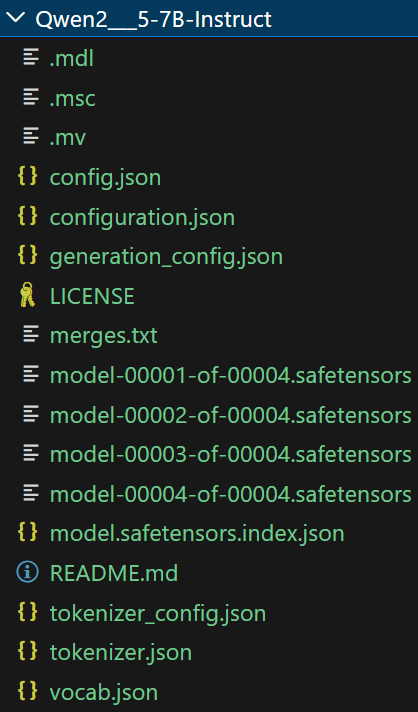
served-model-name 参数将大模型赋予一个 id,后面的访问根据 id 找到对应模型。port 参数指定了大模型接口的端口号,后面会根据端口号访问大模型。
最后,在代码中找到如下区域,修改 INPUT_FILE 为源数据路径,OUTPUT_FILE 为处理结果的数据路径。BASE_URL 格式一般为 http://localhost:端口号/v1 。API_KEY 由于是本地部署,所以随意指定即可。MODEL_NAME 是模型 id。
# ================= 配置区域 ================= | |
.......... | |
# =========================================== |
也可以使用 DISC-LawLLM 替代 Qwen2.5-7B 去做数据提取和预处理,说不定效果会更好。
首先执行上面那个 bash 文件,保持大模型接口的打开,然后再进行数据处理。最后,我对所有的法律数据集都进行了处理,汇总得到了一份格式与 seed tasks 匹配的、样本量足够多的人工标注数据。接下来可以开始用 self-instruct 方法生成数据了。
# 得到合成数据
得到正确格式的人工标注数据后,就可以按照四个步骤,一步步执行来得到合成数据了。观察其实不难发现,四个步骤的脚本其实十分相似,以第一步 —— 根据人工标注数据生成指令的代码为例:
import os | |
import json | |
import random | |
import re | |
import string | |
import tqdm | |
import argparse | |
import numpy as np | |
import pandas as pd | |
from multiprocessing import Pool | |
from functools import partial | |
from rouge_score import rouge_scorer | |
from gpt3_api import make_requests as make_gpt3_requests | |
from openai import AsyncOpenAI, APIConnectionError | |
# ================= 配置区域 ================= | |
BASE_URL = "http://localhost:8000/v1" # 本地 vLLM 地址 | |
API_KEY = "EMPTY" # 本地不需要 Key | |
MODEL_NAME = "lawllm" # vLLM 启动时的 served-model-name | |
MAX_CONCURRENCY = 100 # 并发数 | |
API_TIMEOUT = 180 # 单次请求超时时间 (秒) | |
# =========================================== | |
# 初始化客户端,设置超时 | |
client = AsyncOpenAI(api_key=API_KEY, base_url=BASE_URL, timeout=API_TIMEOUT) | |
random.seed(42) | |
def encode_prompt(prompt_instructions, classification=False): | |
if classification: | |
prompt = "设计一系列分类任务。尽可能明确可能的输出标签。\n" | |
else: | |
prompt = "制定一系列任务:\n" | |
for idx, instruction in enumerate(prompt_instructions): | |
instruction = re.sub(r"\s+", " ", instruction).strip().rstrip(":") | |
prompt += f"{idx+1}. {instruction}\n" | |
prompt += f"{len(prompt_instructions) + 1}." | |
return prompt | |
def sample_machine_instructions(machine_instructions, similarities, n): | |
return random.sample(machine_instructions, min(n, len(machine_instructions))) | |
def post_process_gpt3_response(response): | |
if response is None or response["choices"][0]["finish_reason"] == "length": | |
return [] | |
raw_instructions = re.split(r"\n\d+\s?\. ", response["choices"][0]["text"]) | |
instructions = [] | |
for inst in raw_instructions: | |
inst = re.sub(r"\s+", " ", inst).strip() | |
# inst = inst.strip().capitalize() | |
inst = inst.strip() | |
if inst == "": | |
continue | |
if inst and inst[0] in string.punctuation: | |
continue | |
instructions.append(inst) | |
return instructions | |
def parse_args(): | |
parser = argparse.ArgumentParser() | |
parser.add_argument( | |
"--batch_dir", | |
type=str, | |
required=True, | |
default="data/gpt3_generations/", | |
help="The directory where the batch is stored.", | |
) | |
parser.add_argument( | |
"--seed_tasks_path", | |
type=str, | |
required=True, | |
default="data/seed_tasks.jsonl", | |
help="The path to the human written data.", | |
) | |
parser.add_argument( | |
"--num_instructions_to_generate", | |
type=int, | |
default=100, | |
help="th", | |
) | |
parser.add_argument( | |
"--use_clf_seed_tasks_only", | |
action="store_true", | |
help="If specified, we will only use the classification seed tasks to prompt new instructions. This will lead to more classification instructions.", | |
) | |
parser.add_argument( | |
"--engine", | |
type=str, | |
default="davinci", | |
help="The engine to use." | |
) | |
parser.add_argument( | |
"--num_prompt_instructions", | |
type=int, | |
default=8, | |
help="The number of instructions to use in the prompt." | |
) | |
parser.add_argument( | |
"--request_batch_size", | |
type=int, | |
default=5, | |
help="The number of requests to send to GPT3 at a time." | |
) | |
parser.add_argument( | |
"--api_key", | |
type=str, | |
help="The API key to use. If not specified, the key will be read from the environment variable OPENAI_API_KEY." | |
) | |
parser.add_argument( | |
"--organization", | |
type=str, | |
help="The organization to use. If not specified, the default organization id will be used." | |
) | |
return parser.parse_args() | |
async def main(): | |
args = parse_args() | |
seed_tasks = [json.loads(l) for l in open(args.seed_tasks_path, "r")] | |
if args.use_clf_seed_tasks_only: | |
seed_tasks = [t for t in seed_tasks if t["is_classification"]] | |
seed_instructions = [t["instruction"] for t in seed_tasks] | |
print(f"Loaded {len(seed_instructions)} human-written seed instructions") | |
os.makedirs(args.batch_dir, exist_ok=True) | |
request_idx = 0 | |
# load the LM-generated instructions | |
machine_instructions = [] | |
if os.path.exists(os.path.join(args.batch_dir, "machine_generated_instructions.jsonl")): | |
with open(os.path.join(args.batch_dir, "machine_generated_instructions.jsonl"), "r") as fin: | |
for line in fin: | |
instruction_info = json.loads(line) | |
machine_instructions.append(instruction_info["instruction"]) | |
request_idx = instruction_info["request_idx"] + 1 | |
print(f"Loaded {len(machine_instructions)} machine-generated instructions") | |
# similarities = {} | |
scorer = rouge_scorer.RougeScorer(["rougeL"], use_stemmer=False) | |
# now let's generate new instructions! | |
progress_bar = tqdm.tqdm(total=args.num_instructions_to_generate) | |
if machine_instructions: | |
progress_bar.update(len(machine_instructions)) | |
with open(os.path.join(args.batch_dir, "machine_generated_instructions.jsonl"), "a") as fout: | |
while len(machine_instructions) < args.num_instructions_to_generate: | |
batch_inputs = [] | |
for _ in range(args.request_batch_size): | |
# sample machine instructions from the pool | |
prompt_instructions = sample_machine_instructions( | |
machine_instructions, | |
similarities=None, | |
n=2) | |
# sample human instructions from the pool | |
prompt_instructions += random.sample(seed_instructions, args.num_prompt_instructions - len(prompt_instructions)) | |
random.shuffle(prompt_instructions) | |
prompt = encode_prompt(prompt_instructions, classification=args.use_clf_seed_tasks_only) | |
batch_inputs.append(prompt) | |
tasks = [] | |
for prompt_text in batch_inputs: | |
task = client.chat.completions.create( | |
model=MODEL_NAME, | |
messages=[ | |
{"role": "system", "content": "你是LawLLM,一个由复旦大学DISC实验室创造的法律助手。"}, | |
{"role": "user", "content": prompt_text} | |
], | |
# 您可以根据需要调整这些参数 | |
temperature=0.1, | |
top_p=0.9, | |
max_tokens=256, | |
stop=["\n\n", "\n16", "16.", "16 ."], | |
) | |
tasks.append(task) | |
# --- 并发执行所有请求 --- | |
try: | |
responses = await asyncio.gather(*tasks, return_exceptions=True) | |
except APIConnectionError as e: | |
print(f"API Connection Error: {e}") | |
continue # 跳过当前批次 | |
except Exception as e: | |
print(f"An unexpected error occurred: {e}") | |
continue | |
# --- 格式化结果以兼容 post_process_gpt3_response --- | |
results = [] | |
for response in responses: | |
if isinstance(response, Exception): | |
# 处理单个请求的异常(如超时、API 错误等) | |
print(f"Individual Request Error: {response}") | |
results.append(None) | |
continue | |
# 将 Chat Completions API 的响应转换为 GPT-3 Completions API 的旧格式,以兼容 post_process_gpt3_response | |
if not response.choices: | |
results.append(None) | |
continue | |
message_content = response.choices[0].message.content | |
finish_reason = response.choices[0].finish_reason | |
results.append({ | |
"response": { | |
"choices": [{ | |
"text": message_content, | |
"finish_reason": finish_reason | |
}] | |
} | |
}) | |
instructions = [] | |
all_metadata = [] | |
for result in results: | |
if result is None: | |
continue | |
new_instructions = post_process_gpt3_response(result["response"]) | |
instructions += new_instructions | |
all_metadata += [result] * len(new_instructions) | |
for inst, metadata in zip(instructions, all_metadata): | |
most_similar_instructions = {} | |
rouge_scores = [] | |
machine_instructions.append(inst) | |
fout.write(json.dumps({ | |
"instruction": inst, | |
"metadata": metadata, | |
"request_idx": request_idx | |
}, ensure_ascii=False) + "\n") | |
progress_bar.update(1) | |
request_idx += 1 | |
if __name__ == "__main__": | |
import asyncio | |
asyncio.run(main()) |
因为四个步骤使用的是 gpt3.5 做的数据生成,而当前的数据是中文文本,为了更好的适配,我们要使用中文大模型,因此需要做点代码上的调整,上面的代码已经是调整后的结果。
保持大模型接口的打开,然后运行脚本处理数据,经过四步处理得到合成数据。
四个步骤的脚本有相似的地方,需要关注的点有:
- 不同步骤,给大模型的提示不同,需要对应修改提示。
- 输出文件的路径写在了 main 函数中,处理完后可以对应找到输出文件。
- 用一个列表 tasks 接收大模型输出的结果,然后最后用 await 与 gather 收集异步的每个结果,这种做法能比串行访问大模型更快地处理完得到结果。
- client.chat.completions.create 方法的输出结果不是单纯的模型输出文本,只有用.choices [0].message.content 的方式可以获取输出文本,这值得注意。
最后一个步骤做完后,对应得到了用于微调的合成数据,可以发现这个数据比原来少了很多,因为最后一个步骤会对合成数据进行去重和过滤。如果嫌数据量不够,可以考虑再生成多些数据。
得到了合成数据,数据格式如下。尽管这是由 DISC-LawLLM 自己生成的,质量可能不怎么样,但可以尝试微调了。
{ | |
"instruction": "请为下面的法律文书的案情描述片段贴上标签", | |
"input": "文书:本院在审理中还查明,原、被告于婚姻关系存续期间有夫妻共同债务。", | |
"output": "有夫妻共同债务" | |
} |
# 用 LLama-Factory 进行微调
下一步需要下载模型权重以及微调工具 LLama-Factory。我使用的配置是 4090D(24G)进行微调,因此选择 7B 模型会合适稳妥。后面实测,7B 模型在 batch 为 4 的时候就已经跑到了 20G,在 batch 为 8 的时候就爆显存了。
# 准备工作
首先下载 LLama-Factory,并做好环境配置:
git clone --depth 1 https://github.com/hiyouga/LLaMA-Factory.git | |
cd LLaMA-Factory | |
pip install -e ".[torch,metrics]" --no-build-isolation |
然后下载 DISC-LawLLM-7B,可以考虑到魔塔社区下载。确保安装了 modelscope:
pip install modelscope |
然后在终端虚拟环境执行:
modelscope download --model luohuan02/ShengbinYue-LawLLM-7B --local_dir 'lawllm' |
--local_dir 指定模型的本地目录。
# 数据与配置文件
将微调数据移动到 LLaMA-Factory/data 中,修改名字为 lawllm_data.jsonl,然后打开 dataset_info.json 文件,加入字段:
"lawllm": { | |
"file_name": "lawllm_data.jsonl", | |
"columns": { | |
"prompt": "instruction", | |
"query": "input", | |
"response": "output" | |
} | |
}, |
DISC-LawLLM 的项目里,提供了用 Lora 微调的配置文件 lawllm_lora_sft.yaml,将这个 yaml 文件移动到 LLaMA-Factory/examples/train_lora 中,修改里面的 model_name_or_path(模型下载目录),output_dir(训练内容输出路径),per_device_train_batch_size(批次)。
# 微调
在终端执行下面命令即可开始微调训练:
llamafactory-cli train examples/train_lora/lawllm_lora_sft.yaml |
用下面命令监控 GPU 情况:
watch nvidia-smi |
一开始发现 GPU 占用率极低,大概在 10%~30% 左右波动。
GPU 占用率低会导致训练效率很低,因为 GPU 是并行地训练,所以需要花更多的时间才能结束训练。
查找原因,发现是 deepspeed 的问题。我们看到 lawllm_lora_sft.yaml,发现在 deepspeed 有三个选择:
ds_z0_config.json, ds_z2_config.json, ds_z3_config.json |
而 yaml 文件中默认是用 ds_z3_config.json。大模型从零开始的训练,一般需要多机多卡并行,这个时候就需要机器之间有足够强的通信,因此 z3 能提供很强的机器通信,但是同样需要消耗很多 CPU 资源。因此在我用 z3 进行单机微调时,看到 GPU 的利用率在 10% 波动一会后,突升到 30% 左右然后又快速降到 10% 波动。
关于ZeRO-3
DeepSpeed ZeRO-3 的设计初衷是为了在多卡甚至多机环境下,训练超大模型(比如显存放不下的模型)。
- ZeRO-3 做了什么? 它会将模型参数、梯度、优化器状态全部切片,分散存储。如果显存不够,它还会开启 CPU Offload(将参数卸载到 CPU 内存中)。
- 在单卡上发生的事情:当使用 ds_z3_config.json(通常默认开启了 CPU Offload)时,GPU 在计算每一层时,都需要从 CPU 内存中通过 PCIe 通道把参数 “拉” 过来,计算完再 “扔” 掉。如果 PCIe 的传输速度(特别是如果是 PCIe 3.0 或 4.0 x8 等情况)低于 GPU 内部显存的读写速度,那么 GPU 绝大部分时间都在等待数据传输(IO Bound),只有极少时间在做真正的矩阵乘法。这就是为什么看到利用率只有 10%-30%。
因此,我修改为使用 ds_z2_config.json 进行微调(ds_z0_config.json 为纯 DPO),一下子占用率高了很多,训练所需的时间一下子缩小了很多。
除了 deepspeed 能影响 GPU 占用率,batch、preprocessing_num_workers、dataloader_num_workers 也会影响占用率,具体需要根据实际排查。
